
HeyProto
Guided walkthroughs for working prototypes
Let your prototype
do the explaining.


HeyProto
gives
people
a
clear
path
through
your
prototype
They
can
follow
your
guide
or
explore
on
their
own
1
How it works
Take a quick look around
See how a recorded flow becomes a walkthrough
Record
0
Steps recorded

Pause

Finish Recording
8
Steps recorded

Pause
Finish Recording
8
Steps recorded

Resume
Finish Recording
Click through your prototype.
Each click becomes a step you can edit
Edit steps

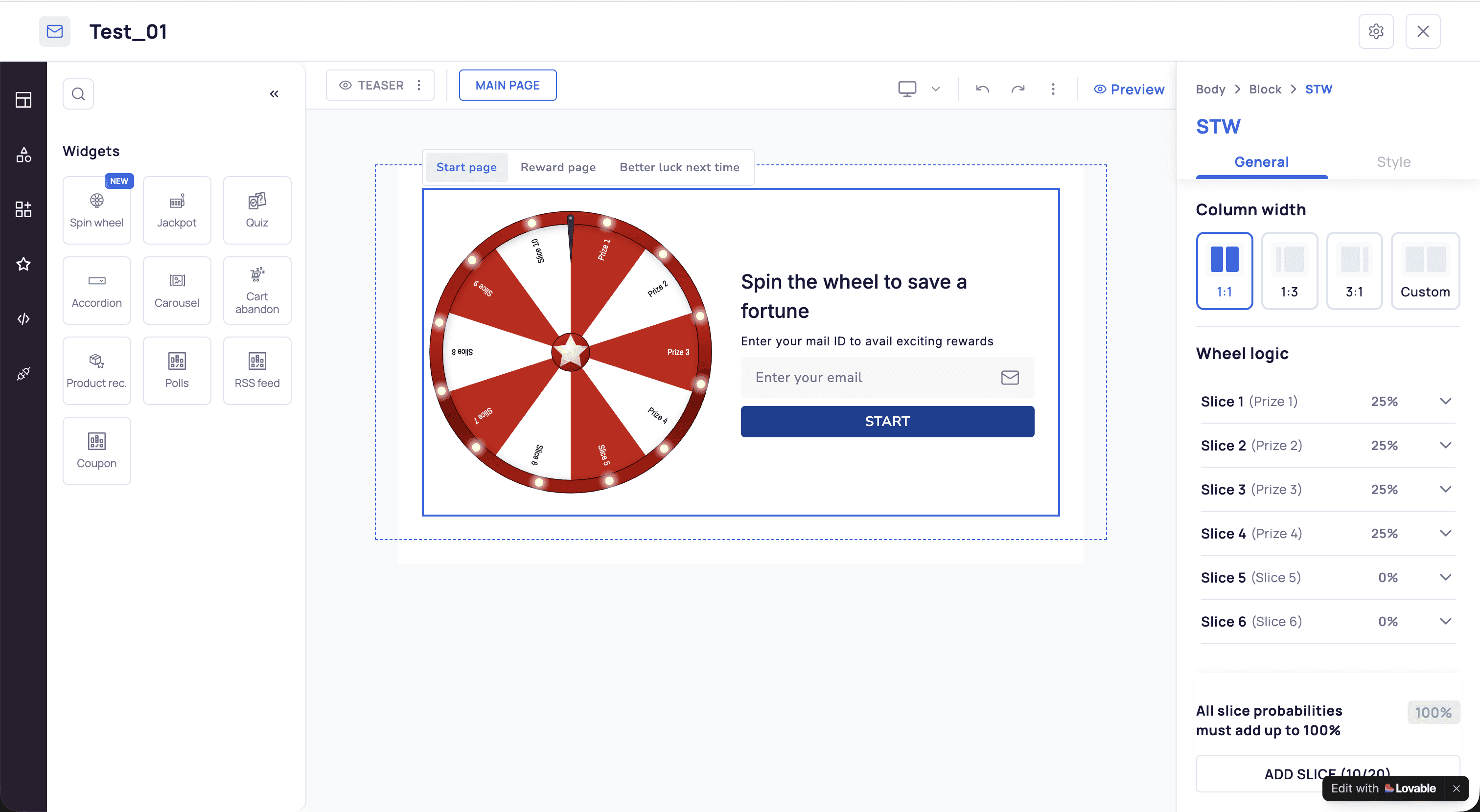
Unified Content Editor
Preview

Share
STEPS
4
Intro
+ Add step
1
Click in Column width
+ Add step
Click the element
+ Add step
Go to Reward page
+ Add step
Go to Reward page
Step 1
Content
Title
Click in Column width
Instruction
Column width helps you in deciding the size of the Spin the wheel you and the RHS content block
Anchor & placement
Column width
Change
Tooltip position

Auto

Below
Left
Above

Right
Next step
Go to the next step when
They click Button “Teaser”

Step 1 of 4
Click in Column width
Column width helps you in deciding the size of the Spin the wheel you and the RHS content block

Back
Next
Moves on when you click the highlighted element
Make each step clear
Add context and remove clicks people do not need
Preview
Try it before you share it
Follow the walkthrough and check each step
Insights
Insights
Custom agent · Homepage
Last 7 days
People
90
86 views · 5 returned
Started
83%
75 people started
Finished
39%
29 of 75 who started
Time to finish
2m 4s
Median, start to last step
Quick insight
46 of 75 starters did not finish. Review where they leave.
Activity
0
10
20
Mon
Tue
Wed
Thu
Fri
Sat
Sun
Walkthrough funnel
People
90
Started
75
Finished
29
See where people stop
Check which flows get opened and which steps people reach
2
Live guidance
Your prototype, minus the guided phone call
Highlight the next step on your live prototype. People can follow along, switch the guide off to explore, and return when they need a hand.
Live guidance requires the HeyProto extension
3
Who it is for
You make the prototype. HeyProto helps you explain it.
Fewer “where do I click?” messages. / Give reviewers a clear starting point and the context they need to try your prototype
4
Features
A little guidance.
A lot less explaining.
Record once. Edit, preview and share from one place. Free, with no account.
Record a flow
Turn your clicks into steps. Pause, resume or undo as you go


8
Steps recorded
Pause
Finish recording
Edit every step
Add a title and instruction, choose what to highlight, and place the tooltip
Step 1
Content
Title
Open the teaser
Instruction
Select Teaser to edit its content
Anchor & placement
Button “Teaser”
Change
Tooltip position

Auto
Below
Left
Above
Right
Next step
Go to the next step when
They click Button “Teaser”
Guide on the live site
Show people what to try next on your working prototype

Step 1 of 7
Click Agents
Select Agents to open the agent menu

Back
Next
Moves on when you click the highlighted element
Share captured screen
Let people click through recorded screens in their browser when captures are included.
Share link
Send a flow or project by link, or download a package

Public
Anyone with the link can view

Create link
https://heyproto.in/s/…demo/cmvqyoi9f1
HeyProto package

Download
Screens as a website
Download
See where people stop
Review opens, starts and completions to find steps worth improving
5
Sharing
One link. A clear place to start
Share a flow or a whole project. With HeyProto installed, viewers follow the guide on your live site. Include captured screens so others can click through them in their browser
Share one flow or a whole projec
Update the shared version when your flow changes
Download a package or a website of captured screens
7
FAQ
Questions, answered.
A few things before you start
What prototypes does it work on?
Use HeyProto on working websites in desktop Chrome, including localhost. Browser pages and local files are not supported. Some embedded or restricted content may need testing
Do I need an account?
No. Install the extension and start recording
Is my data safe?
Recordings stay in your browser until you share or export them. Review the flow and any captured screens before sharing.
Do reviewers need the extension?
For guidance on the live website, yes. If you include captured screens, viewers can click through those in their browser without the extension
Can I edit a walkthrough after sharing?
Yes. Edit the walkthrough, then update its shared version so the link shows your changes
What does Insights track?
See how often a walkthrough is opened, started and completed, plus the steps viewers reach
Is there a free plan?
Yes. HeyProto is free to use
Which browsers are supported?
Use desktop Chrome to record and follow live walkthroughs. Captured walkthroughs open in a browser without the extension